T : +(603) 7806 3550   |   F : +(603) 7806 5586
everworks it expertise

Cloud Computing

Offering you the best

everworks services

Data Backup

Data backup solution

everworks infrastructure

This is default featured slide 3 title

Go to Blogger edit html and find these sentences.Now replace these sentences with your own descriptions.

everworks cloudster

This is default featured slide 4 title

Go to Blogger edit html and find these sentences.Now replace these sentences with your own descriptions.

everworks databackup

This is default featured slide 5 title

Go to Blogger edit html and find these sentences.Now replace these sentences with your own descriptions.

Tuesday, 28 July 2015

SME business ideas: Develop an online presence cheap


Here is why you will love this guide:


It is beginner-friendly, up-to-date, fast to set up, and best of all free. :-)

Step 1: Choose the best website hosting platform.


Before you start worrying about color schemes and domain names you have to first decide what platform you are going to build your website with. 

The objective of this guide is to give to you an easy guide to building your first website regardless of what you choose to start with; well almost all of the available services out in the world today should incorporate basically the same principles.

What do I mean by a "platform"?


Back in the days creating a website required prior knowledge of fancy codes (prerequisites: HTML, CSS and even Flash) and they require a great amount of investment in time to learn and were very challenging to master.

HOLD IT! Today much of it has changed and the past has contributed to much of what is today's conception that creating a website from scratch is difficult or requires a lot of coding and design skills - but rest assured that is no longer true!!

IN 2015, there have been a plethora of content management systems (CMS) like WordPress that have been making website creation accessible to almost anyone who have an interest to do so.

A CMS is a user-friendly platform for building websites and managing your own online content, instead of using a bunch of complicated HTML pages, constructed using pure code.

Amongst the most popular website building platforms are Wordpress (50.07%), Drupal (17.07%), and Joomla (6.44%). Just from those you can see that half of the internet is running on WordPress.

Why choose WordPress?


FREE. There isn't any other reason that beats that! The other part to it is WordPress is beginner-friendly, powerful, mobile-friendly, and a massive support community. There are others too such as Drupal which is popular with web developers and experienced coders but comes with a steep learning curve that makes it a terrible experience for beginners, and Joomla which still requires a little bit of technical coding to make it work the way you want, but this works fantastic for online stores.

For beginners, WordPress is a good place to start.


You won't need to install or set up anything because in Step 2 will explain choosing a domain name and finding a great hosting plan for your website;

and in Step 3 you will be guided through a step by step process to install and customize a WordPress website.

Step 2: Choose a Domain Name & 

Website Hosting for your website.


To get a new website online you are going to need two things:


  1. a domain name (www.yourname.com)
  2. hosting (a service that connects your website to the internet)


As you are already aware the WordPress platform itself is free, but a domain name and hosting will cost you a fee. For a more targeted approach to your Malaysian SME business obtaining a www.yourname.com is relatively inexpensive and should cost you from RM55 onwards a year depending on the availability of the domain name.

Having your own hosting will ensure that your website loads quickly and won't go down for hours at a time (this is really important for everyone who visits your pages).

Where to get a domain name and hosting.


You can get your domain name from here and hosting from here.

It is affordable, has good customer service and comes with some good deals. When you get a domain name you will also get a personal email account(s): you@yourname.com which is more professional sounding than a generic Gmail or Yahoo Address.

Step 3: Set up your WordPress Website.


Once you have setup your domain name and hosting you should be well on your way. Now is the time to get your website up and running. The first thing you will need to do is install WordPress to your domain.

Installing WordPress.


Some hosts provide 1-click-installation. But to install WordPress Manually. All you have to do is:

  1. Download WordPress from here.
  2. Create a new folder on your desktop and unzip WordPress in it
  3. Look for a file named wp-config-sample.php and rename it to: wp-config.php
  4. Now open the wp-config.php (with notepad for example) and fill the following lines: (1) define ('DB_NAME','database_name_here'); - Database name (if you don't know it ask this from your hosting support), (2) define ('DB_USER', 'username_here'); - Your hosting username, (3) define ('DB_PASSWORD','password_here'; - Your hosting password. After you have filled the gaps, save the file.
  5. Now log into your hosting ftp (download FileZilla for that). The FTP address is usually ftp.yourdomain.com, username and password are the same that you used to register your host.
  6. If there is any file name "index" - delete it. After that upload all the files from your WordPress folder to your FTP server. (You should be able to use "drag n drop" function in FileZilla.
  7. Once you have completed the previous steps go to your URL: yourname.com/wp-admin/install.php


You should see a form and fill it in and you are ready!

Choosing a theme/template for your website


Once you have successfully installed WordPress to your domain, you will see a very basic yet clean website:

But you don't want to look like everyone else now do you? ;-)

This is why you need a theme. Go to your name.com/wp-admin and you should be able to find over 1500 free themes, along the side bar on the left for "Appearance" and then "Themes".

If you want something more professional you could find a professional website designer or head over to ThemeForest.net where there is a really big library of themes to choose from with varying costs!

But before you do that take time to browse free themes as they are very professional.

IMPORTANT: Changing themes won't delete your previous posts, pages and content. You can change themes as often as you want without having to worry about losing what you have created previously.

How do you add content and create new pages?


Easy just look along the sidebar in the WordPress Dashboard for "Pages" > "Add New" and once you have clicked on it you will find a screen that looks a lot like Microsoft Word. Add text, images and more to build the page you want and then save it when you are done.

Adding pages is similar to adding new postings. Click "Appearance" > "Menus" in the sidebar of the WordPress Dashboard and find the page you have created and add it to the list by clicking the checkbox next to it and then "Add to Menu".

Setting up a static front page.


Some people have frustrations where they say that their frustrated that their home page looks like a blog post. You can fix that by making your home page "static:.

A static page is a page that doesn't change as the name implies, and unlike a blog where the first few new articles show up at the top every time, a "static" page will show the same content overtime someone comes to the site - very similar to a home page you have designed.

To set up a static front page:


Go to "Settings" > "Reading" and choose a static page that you have created. "Front Page" denotes your home page, "Posts Page" is the front page of your blog (if your entire site isn't a blog).

If you don't choose a static page on your own, WordPress will take your latest posts and start showing them on your homepage.

Installing plugins to get more out of WordPress


"Plugins" are extensions that are built to expand WordPress capabilities, adding features and functions to your sites.

Basically shortcuts to add to your website without having to build the feature from scratch.

How to start installing a new plugin?


Go to "Plugins" > "Add New" and simply start searching. There are over 25,000 different free plugins so you have got a lot to choose from!.

Installation is easy - once you find a plugin you like just click "Install".

Congratulations - you are ready to launch!


If you have followed the steps in this guide, you should now have a fully-functional WordPress website!

I hope you have found this guide useful.


Share this page if you like it and if you have any issues leave a comment and I will try to solve them for you!

Thursday, 9 July 2015

How to create a winning online marketing campaign


Have you come across a website and noticed it hasn't been updated for the past few years, pictures look outdated and the layout of the website isn't very appealing; giving the impression that the website has been neglected. When navigating to a competitors website it looks fresh, graphics are crisp, content is current and there is consistent communication through their social media; chances are people are likely to choose their competitors.

On the Internet you have less than 8 seconds to make an impression on a customer, and dependent on the impression you have imparted on them it gives them motivation to continue on. A website should load quickly, and should have features that can give your business scalability and flexibility, because anything less would likely lead an internet customer (potential lead) to move on before any of your carefully prepared content has been presented.

For any small business owners, the internet can be a powerful marketing tool as there is a great pull factor with the attraction of the ability to reach millions of potential customers with one advertising campaign. However exhilarating it may sound it can also be overwhelming. One burgeoning question is how do you make sure that you are seen in the thick of the crowd? Why are there clear distinctions between companies where some are very effective online, but others aren't? Like most advertising plans there are multiple methods to creating great online marketing campaigns.

Unfortunately it won't be a simple task and I won't be giving you false promises to say that it will be. Creating an online advertising campaign requires effort and dedication like most other traditional methods of advertising. 

In this article we will look into:

  1. What are the pre-stages to planning required;
  2. Tools required;
  3. the importance of having the right management;
  4. and choosing a good hosting provider.

The pre-stages to planning required before you create an online marketing campaign.


  1. Before beginning any marketing campaign it is important to find out what is the purpose and goals to the campaign;
  2. You will need to identify what resources are available and ready to be allocated without proving to be too much of a burden to ongoing business operations and constraining cash flows;
  3. identify where your customer bases are and what habits they perform daily;
  4. conduct a risk analysis on the target positions, and risks involved in the inherent venture;
  5. consider the nature of your competition, and what they are doing;
  6. and identify the characteristics of your product/service (whether it would be beneficial to demonstrate the product/service through video or an image?)


Develop a brand name and image before starting communications.


Develop a fixed image that reflect your company ideals and culture of your company;
combine your ideas, with your company name and logo so that you can use them in your online marketing;
and there should be a certain degree of standardization to allow for potential leads to continually meet preconceived expectations.

Tools required.


Social media - the peer pressure provided through key social media influencers adds weight behind a product, service, or cause as current users are dependent on provided reviews (Facebook, Instagram, Twitter, Pinterest, Tumblr, YouTube, and etc.;
SEO - this tool isn't dead and still provides a great deal of amount of relevance in your online marketing campaign, it will help greatly to have your online marketing campaign to search for on major search engines such as Google, Yahoo, and Bing;

Less intuitive point - choosing the right hosting provider for your website.


Advertising campaigns and marketing initiatives however innovative they are won't be effective without a reliable central reference hub that directs all customers and leads to participate in the product or service your small business wants to sell. Choose an external hosting provider to outsource your IT needs to reduce your overall business overheads, and pay one flat fee with unmetered data transfers to avoid any surprise fees.

Final point: Track your results.


Performing any activity or task should be fully reflected upon to learn and provide an accelerated growth curve for the company in its future endeavors. Launching an online marketing campaign can be either rewarding or costly. It requires attention to detail and a great amount of planning, but the upside could extend potential company growth.

© photo by Yahoo

Tuesday, 7 July 2015

Why should SMEs choose to host externally?


Technology over the years have influenced and shaped the business world. There is a large amount of users and especially small business owners that have turned to the Internet to help them to deliver some type of service or function as it is evident that the Internet can help to perform a lot of operating business activities. There has been a rise on the need for external hosting. Why? The attraction of outsourcing business activities and directly saving costs is among one of the big factors in influencing this change.

The reality is that external hosting is customizable to fit almost any budget and project - as shown through these hosting packages on offer. When working with an external hosting provider it is important to know which features you really need and how they will help your small business grow. Once these goals are aligned, the options which are on offer become very attractive to any business.

For business managers the relation in choosing outsourcing as a business strategy should be reasoned with alignment of business goals and objectives, available resources, push factor; whether there is an internal need to pursue hosting or pull factor; due to attractive external propositions and proactive environmental scanning to determine what best fits your current needs.

What you should look for when outsourcing your hosting needs:

  1. a dedicated 24/7 phone & email support deployed to help you with your day-to-day IT needs. This comes with no additional human capital requirements on top of the service fee charged.
  2. Unmetered data transfers; no hidden terms that would severely limit your business potential and not reflect on your investment and prove to be expensive poorly reflecting on your return on invested capital.
  3. Allows you to try without fear of commitment, on offer should be a 30-day money back guarantee with no questions asked to accommodate the notion that not all services provided, although designed with good intention, fits everyone.
  4. One other important distinction that you should look for is the ability for your outsource hosting provider to be able to accommodate your infrastructure extension requirements. A big misconception is that an externally hosted environment once deployed becomes an island that is independent/isolated from your businesses future expansion requirements. 


As more and more small businesses are seeing the benefits of moving towards outsourcing their complex IT needs. Your business will be able to enjoy both the cost benefits and ability to adapt to an ever changing business environment that is highly influenced by a hyper-competitive IT integrated ecosystem.

photo by © Brennan

Thursday, 2 July 2015

Use Email to Transform The Way You Work


Email is now part of our everyday life and is going to remain to be for a long time to come, backed by research at IBM email isn't dead. Email has gained widespread popularity as it has reliably provided a quick, instant, 'formal', way of communicating through the widely available internet today.

Email can be overwhelming, and instead of managing email, what we needed was a better way to communicate, ultimately engaging in deeper engagement and better outcomes.

EVERWORKS Web & Email Hosting solution is a platform where the focus is on the communication between people bringing together messaging with web access to allow greater accessibility and flexibility, and here are the concepts behind the design of EVERWORKS Email Hosting solution:

A) Better value: A system that integrates website, email, and database hosting to provide you with scalable options. Business class email allows you to build you business identity, filter for spam to keep your inbox free of clutter, with an internet connection and any internet browser grab your email anywhere, and access to 24/7 expert help.

B) Clarity over clutter: An intuitive control panel helps users to take quick action on content previously scattered across multiple applications.

Here are some intuitive ways you can use email to ensure effective communication between internal and external networks:

1. Keep your messages brief

Reading from a computer screen isn't easy, use shorter paragraphs and bullet points; cut straight to the chase. Avoid using capital letters as it sends unintended interpretations such as the appearance of being bossy (ICAEW 2008).

2. Stay organised

There is an age old saying that staying organised allows you to get more things done, stay more focused, and remain in control over most situations. Take this approach to email and invest 2 hours of your time right now to go through your inbox, create filters that give automated actions to specific email to reduce repetitive tasks and allows you to manage and attend to the most important emails first. Find out how I keep my personal email organised by just using Gmail, and the Mailbox app.

3. Advantage: Email as evidence

The advantage of email is it is a stored accepted form of instantaneous form of communication that is applicable in many ways. For example emails can be used as evidence, that there exists proof of communication between the sender and the recipient, although there are issues in the form of relevance, authenticity, hearsay, original or duplicate documentation, and unfair prejudice (Sarah, 2010). Consult a lawyer to develop an email framework to follow to fully utilize the advantage of using email as evidence. Is there a need to consult a lawyer? Yes as laws differ from place to place and it is highly recommended that you find a representative lawyer that is familiar with domestic laws.

photo by Caden Crawford

References:


  1. ICAEW 2008, 10 ways to use email effectively, ICAEW <http://www.icaew.com/en/archive/library/subject-gateways/career-and-personal-development/communication-and-presentation-skills/small-business-update/10-ways-to-use-email-effectively>
  2. IMB Smarter Planet 2015, How To Use Email To Transform How We Work, Forbes, <http://www.forbes.com/sites/ibm/2015/02/19/how-to-use-email-to-transform-how-we-work/>
  3. Sarah 2010, Legal consideration for electronic evidence, Part 3: Applying the rules of Authenticity, <https://crlgrn.wordpress.com/2010/05/11/legal-considerations-for-electronic-evidence-part-3-applying-the-rules-of-authenticity/>


Note:
If you like articles like this please bookmark this blog as there will be more similar and other topics regarding technology, business, telecommunication, and EVERWORKS related updates. Feel free to leave your comments on this topic below.

Monday, 29 June 2015

Keeping Email Organised


In the age where email is an inevitable tool and essential to our everyday life, I went about a personal mission to solve the behemoth problem, the email inbox. Tough, resilient and ever present the problem of having an uncharacterized amount of email stored in the inbox can be frustrating when there is a need to find a one specific thread for an important use.

Here is a personal tip on how to keep email organised.


I use a combination of the Mailbox App, the standard Mail Application on iOS and Gmail. You can adapt with different combinations of services, but for me these services are the most effective combination that keeps me productive.

I will be splitting this article into appropriate action steps that you could break up into chunks to either perform it all at once, or periodically. Keep this in mind, keeping email organised is a lifestyle and a habit. Change some small habits and you can have your email inbox "free" from clutter which keeps you notified of the most important things that need done.

You will need to know of the existence of the All Mail function in Gmail, which is basically an Archive of all of your read email.


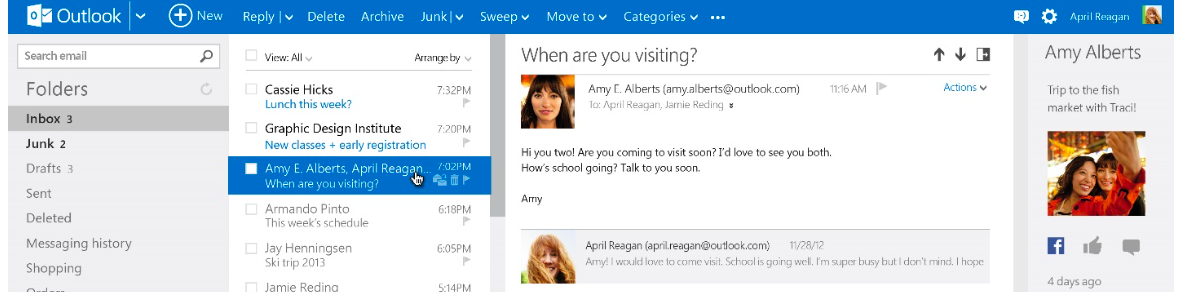
Outlook.com has the same "Archive" feature which Google Mail has, you just have to make sure you update your Mail service by finding the button that says "Archive" at the top of Outlook.com and click it.


First actionable step:

Filter through your inbox manually.

Firstly, find email that are junk to you by using the search function that comes with most email clients (select all and delete). I suggest only family threads, travel tickets, receipts, keeping conversations that have indication of use or insurance for verbal contractual agreements, and other important things.

Secondly, the fastest way I found to filter through bucket loads of email is to find similar email threads and add filters to it. A detailed how-to add filters is detailed here.

Filters help you to find "topic" related emails that have been archived making it easy to find when the time comes. You could start with applying filters such as a specific Person/Service name, even activities such as "Soccer", "Coffee Networking Session", and etc.

It took me around 2-5 hours of organizing to filter through my inbox and you don't have to do this all in a marathon, but do it a few times in a week and you will have this done in no time.

Second actionable step:

Applying automated filters. 

This article from Mashable gives a good guide on automatic filters.

Like the above first actionable step. Applying automated filters to your frequent incoming email will ease the process of receiving email in the future. This so that you don't have to go through the entire process of manually filtering out a large bulk of email again in the future. All you will need to do is to manually filter emails that are infrequent.  

Third actionable step:

Downloading Mailbox app.

The Mailbox app integrates well with Gmail. (I have yet to try this app's functional use Outlook.com) It helps me make full use of the All Mail (a.k.a an archive feature) service on Gmail to its maximum potential.

The theory behind it is your inbox should be a place where you should only keep email that is of immediate importance and require your attention and action, emails that have been read and need to be kept for future reference or to signify completion should be stored away in an archive. This keeps your email inbox free of clutter and allows you to receive only the most recent email that needs your immediate attention.

The app comes with a whole lot of other features that allow you to put it off for later, remind at a later time, and etc. The best part of using the Mailbox app is it comes free. Other advantages include integration with Dropbox for backups and more (Mailbox has been acquired by Dropbox).

Using native email apps

Reasons why I still use the native Mail client that comes with iOS.

I receive a lot of email to my Gmail, but there are times where I have other accounts like specific work email, university email, hotmail accounts and other subscriptions that I would like to be notified for. Mailbox currently only allows connection to one email account, and does not facilitate other mail clients.

Other self-hosted or custom services need to be connected to the traditional Mail client that comes with iOS which I have found to be very good for notification across different accounts.

Mailbox + Gmail + Native Mail App

Why should you consider doing this?

Keeping organised allows me to respond quickly and effectively to inquiries that require my most immediate attention. Although the Mailbox app does not solve every mail client that I own, but it allows me to filter out, that is of most importance to me, my personal email, Gmail.

Stormtrooper photo AttributionNo Derivative Works Some rights reserved by Jim Bauer

Note:
If you like articles like this please bookmark this blog as there will be more similar and other topics regarding technology, business, telecommunication, and EVERWORKS related updates. Feel free to leave your comments on this topic below.

Friday, 3 April 2015

Capitalize on Facebook Messenger App


Facebook Inc. is opening up its messenger app so that other software developers can add new features, such as photos videos and other enhancements to their online conversations (Bloomberg 2015). Take a quick look at Bloomberg's quick 3 minute video to get a brief on Facebook's F8 conference below

*Skip to 1:31 to see what Mark had to say about making the Messenger App a place where customers can communicate with businesses that they care about.


Mark puts out a clear example of how this can be used to help your business, "if customer has put an order online, but would like to change it all they have to do is communicate through the Messenger App to get it done". Mark adds, "that when a customer has placed an order they can receive shipping information, receipts, and more also through the Messenger App".

Here are five suggestions to how your SME business could capitalize on Facebook opening up its Messenger App to other businesses and developers:


1. Provide more effective means of communication


Your SME Business could provide faster communication to the person's mobile, with simple and easy responses to allow effective initial enquiries to be addressed.

2. Give "real-time" information transmission to ease customer worries


Mark's earlier suggestion that businesses could send important information to customers after completing their purchases such as tracking information, and e-receipts that can be immediately scanned when physical items are delivered.

3. Add a key advantage, "human-factor" to your digital business


Technology has a tendency to alienate a person and perform very much like it was intended to be, a robot, but your business could be very different in having convenient means of communication to provide effective personalized support, and more.

4. Follow-up for services


What better way than to follow-up with a client or prospect right after a presentation or consultation, with scheduled future appointments that could link up with their phone's calendar applications, or even suggestion of future available times that your customers could likely need.

5. Save paper


You could reduce the need for a printable receipt, having to submit forms with digital integration. This also reduces repetitive work such as data entry.

Key Advantage: 44.78% of Malaysian Population Adoption


Here is hard evidence, empirical statistics, to show you why Facebook Messenger is a big thing. Lets compare Facebook Messenger with a notable competitor WeChat. According to Hays (2014) WeChat had 40 million users in 2014. While Facebook has some 1.23 billion users at the end of 2013 (Sedghi 2014).

Not convinced? Can't see how this helps you? Data suggests that Facebook adoption in Malaysia is staggering with 13.3 million users in 2013 making it 44.78% (World Bank Data: Malaysia Population is 29.7 million in 2013) of total Malaysian population (Mahadi 2013).

Take that approximate and multiply that with an indicator, and you would get a rough estimated market size to make use of. Combine that with industry contribution to Malaysia's GDP, approximately (USD 313.2 billion x 3) MYR 939.6 billion should give you a rough estimate of the market opportunity available to your business (World Bank 2015).

Barriers to entry, is a bunch of smush.


All you need to worry about is getting your business strategy right. Hosting for your SME Business is super easy with worry free hosting like this and you don't need to develop yourself, all you need to do is to hire a professional consultancy company to implement Facebook Messenger App into your business offerings.


photo by Facebook video by Bloomberg

References:

Bloomberg 2015, Facebook Opens Up Messenger App to Developers and Businesses, Bloomberg, <http://www.bloomberg.com/news/articles/2015-03-25/facebook-opens-up-messenger-app-to-developers-businesses>

Hay, S 2014, The WeChat Revolution, The Clickz, <http://www.clickz.com/clickz/column/2363343/the-wechat-revolution>

Mahadi, N 2013, 13.3 million M'sians are Facebook users, Borneo Post, <http://www.theborneopost.com/2013/06/16/13-3-million-msians-are-facebook-users/>

Sedghi, A 2014, Facebook: 10 Years of Social Networking in Numbers, The Guardian,
<http://www.theguardian.com/news/datablog/2014/feb/04/facebook-in-numbers-statistics>

World Bank 2015, Malaysia, World Bank Data, <http://data.worldbank.org/country/malaysia>

Note:
If you like articles like this please bookmark this blog as there will be more similar and other topics regarding technology, business, telecommunication, and EVERWORKS related updates. Feel free to leave your comments on this topic below.

Friday, 13 March 2015

3 Ways To Transform Your SME Business (for Malaysia)


As Datuk Seri Mustapa Mohamed, Minister of International Trade and Industry highlighted in Fokem 2012 that it is evident, Malaysian Small and Medium Enterprises (SMEs) will be a major driver (expected contribution of 41% of GDP by 2020) of the future economy. 

Today the small business landscape is globalized with growing interdependency, and one key internationalization driver is the advancement of technology, with benefits of implementation of technology, as proven by Delhaize America, an operator of grocery chains, having managed to transform its business by adopting technology through running Big Data on the cloud to study the impact of local weather on store and category sales (Forbes: IBM 2014). 

According to Ali S. Saleh, Victoria University and Louis Burgess, University of Wollongong; 74% of respondents (of a sample of 100 Malaysian firms) of SMEs surveyed, indicated that they believed Informations and Communications Technology (ICT) will improve their competitive position, and in regards to future implementation of ICT 50% of Malaysian SMEs indicate they want to do so.

Here are three ways that you can transform your SME business:


1. Adopt a data mindset to your business.


Capitalize on a hidden market opportunity. With the adoption of ICT your SME business is keeping 'on-track' as there is a prediction of increase to 43% of big data technologies over the next 10 years, with the accelerated adoption of the cloud. More companies will look to technology as a strategic advantage to successfully scaling to meet new global economic demand (Joel 2013).

2. Let computers work hard for you.

Enhance your capabilities. ICT enables your SME business to digitally perform daily rudimentary tasks by having reallocation of existing and new human capital to more resourceful positions that would potentially contribute to your SME's economic benefit. In a research, it was found that through data processing advances in the 21st century it allowed Moore Corp. Ltd. to better access the Internet for e-delivery of document viewing, e-billing, e-commerce and web design (McClatchy 2007).

3. Focus on communication.


Build reputation. Daily business activities can overwhelm, and it is easy to miss small touchpoints that can have a large influence over your business. Email, a functional product of ICT, can transform the way we work and communicate with important stakeholders to disseminate accurate information that will ensure smooth business transactions.

There will be problems and here are two that are being faced by Malaysian SMEs:


Adoption of ICT is difficult. Findings in a study by Junaidah Hashim, Associate Professor show's that adoption of ICT is difficult as this is significantly correlated to the period of adoption. However, adoption of ICT can occur over structured planed phases to ease the process, for example with Delhaize America's gradual adoption of technology eventually leading it to become a key competitive advantage. Understandably even early adoption may pose problems to a SME business, but there are structured services that allow easy adoption into ICT.

Lack of resources. On a side note, is globalization cum internationalization just limited to the 'big boys', multinational enterprises (MNEs)? The answer is no; there has been a large degree of early adoption of internationalization of 'new' companies (the SMEs) in a classification of companies known as "Born-global firms" (one example is Technico). Where internationalization is at the core of the beginning of conception of their business. High adoption of ICT allows these Born-global firms to quickly capitalize on key international markets, meet competition directly, and enhance capabilities to customers with quick implementation of innovative new methods to accommodate tight resource constraints. ICT can be expensive, but as with most industries there are competitive pricing on services that allow budget friendly alternatives to facilitating ICT.

--

Technology will be here to stay, and will in one way or another influence your business, and ultimately the decision of whether to accept technology as apart of your business or to acknowledge it only when it is necessary ultimately rests with you. Something positive you can take back from this could be that now you know you are looking for ways you could transform your SME business, and you have already taken the first step.

Photo by Yuxuan Hou

References:

Hashim, J 2007, 'Information Communication Technology (ICT) Adoption Among SME Owners in Malaysia', Vol 2, No 2, International Islamic University of Malaysia.

Joel, Y 2013, Young: Technology opens new business opportunities, Kelowna Capital News, Kelowna.

McClatchy, SJ 2007, Technology creates business opportunities, Tribune Business News, Washington. 

Saleh, SS and Burgess, L 2009, 'Factors impacting the adoption and use of ICT in the Malaysian SME sector', Research Online, Faculty of Commerce, Papers, University of Wollongong.

Note: 
If you like articles like this please bookmark this blog as there will be more similar and other topics regarding technology, business, telecommunication, and EVERWORKS related updates. Feel free to leave your comments on this topic below.