T : +(603) 7806 3550   |   F : +(603) 7806 5586
everworks it expertise

Cloud Computing

Offering you the best

everworks services

Data Backup

Data backup solution

everworks infrastructure

This is default featured slide 3 title

Go to Blogger edit html and find these sentences.Now replace these sentences with your own descriptions.

everworks cloudster

This is default featured slide 4 title

Go to Blogger edit html and find these sentences.Now replace these sentences with your own descriptions.

everworks databackup

This is default featured slide 5 title

Go to Blogger edit html and find these sentences.Now replace these sentences with your own descriptions.

Wednesday, 30 April 2014

Twitter expands! Images Increases Clicks.

Twitter has made some rather big changes and here is one of them. Twitter just added inline images to tweets so you don't need to click a link to see an attached image.

*please note that this only works for images that are uploaded directly to Twitter. 

Expanded Tweets. How they stand out amongst the rest?


Tweets with pictures look like this now on Twitter:


Here it looks like in the stream:


It isn't surprising that Twitter is starting to focus on images and videos uploaded to the service itself. In fact Tweets using pictures were 94 % more likely to be retweeted.

It is also found out that Tweets including Instagram links were 42% less likely to be retweeted.

How inline images have impacted us so far


We did some experiments by adding an image to our tweet and retweeting some other tweets with images to see what the results were. Using some of the statistics from our internal research it shows that there were to be more "clicks" as a result.

What this does for Twitter?


Twitter right now is riding it high, having just announced the company's IPO and things don't seem to be slowing down with new features being added.

Some people have pointed out how advertising could become a bigger part of Twitter's strategy.

How does inline images help Malaysian businesses?


Inline images help increase likelihood of a Tweet therefore it does boost more exposure, and open up new avenues for business to engage through social media.

Engaging customers through showing them exactly the product you have to offer is powerful, rather than 'just' describing it with words adds an invaluable advantage.

---

On a side note: If you liked posts like this, Follow us on Twitter or keep up with us through this blog.

Be sure to find out more on how you could offer an Internet or mobile business easily.

Monday, 28 April 2014

EVERWORKS IDC: Reminder of Rack Price Increase

In recent weeks there have been inquiries on the affects in change of pricing some of our clients have faced, and to clear the air and provide the details required, released here would be the official statement of EVERWORKS, in regards to the increased tariff rates imposed by Tenaga Nasional Berhad (TNB).

Effective 1st March 2014, EVERWORKS has imposed a price increase in our monthly rack recurring charges and HVAC aligned to the increase rate imposed by Tenaga Nasional Berhad's (TNB) new tariff announcement dated 2nd December 2013.

Enclosed herewith the calculation of the new rates as below:


After much consideration the price increase due to the increased tariff rates, has led to our decision to increase prices from March onwards.

As we continue to strive to offer you the best service and support possible, EVERWORKS has committed to absorb increase in costs to further support our clients for the month of January and February.

Latest colocation package pricing can be referred to here.

We are committed to provide our customers with the best possible service, for further assistance regarding administrative matters please consult our administrative team: admin@everworks.com, and for further assistance regarding technical support issues please contact our ever-ready technical support team: cvs@everworks.com.

Wednesday, 23 April 2014

How to use Google Analytics: Beginners' Guide

This will guide you on how to use Google Analytics even if you have just started out. Google Analytics as the name implies is a tool (one of the best) that allows you to measure your website traffic (this which greatly influences your ability to be found on the web through search engines - you can use Alexa to find out just where you are roughly), giving you valuable information for you to make informed decisions. With just a little bit of setup and effort, this tool will give you a war chest worth of information, on who is visiting, what they are looking at or what they are looking for. With that information I am sure that you would be able to take it from there, and with a bit of time practicing with Google Analytics I am sure you would be able to use it like a pro!

This page was designed to ease you into the application and teach you how to use almost all aspects of Google Analytics. In future there will be more in-depth tutorials that will show you what other things can Google Analytics do to empower you.

Google Analytics Interface (Video Tutorial).


What better way to show you the route than to have a 'personal' tour from Google themselves. This Google Analytics Interface Introduction Video shows you the different reporting sections on the Google Analytics dashboard.

Getting Started


Now that everything has been formally introduced, let's get down to business and fix up everything!!

Step 1: Account Setup


Before you start anything the most important step in order for you to use Google Analytics, you will need to (obviously) set up an account with them. This will provide you with a unique code/identifier/number to add to your website. *important note: you can only access information about your own website. You will not be allowed access to other people's information, unless given special permission, and likewise for other people who want access to your information.

Permissions can be granted to those that you give special permission to. Other than that if that step was not taken into account the only person that can access your website statistics will be none other than yourself.


  1. Go to the Google Analytics website - here.
  2. If you do not have a Google account, you can sign up here, but if the link does not work you can always find the "Sign Up" button which is located somewhere above the top right-hand corner of the Google Analytics Website. (If you have a Google Account already skip this step and just sign-in.)
  3. Click the "Sign Up" to continue. (You may be wondering why there is another sign-up button just when you have done registering for a Google Account, or if you already own a Google Account; this "Sign Up" was meant to define signing up or registering for the Google Analytics Service.)
  4. In the next window, provide Google Analytics with the URL of the website you wish to analyze.
  5. Give the website an account name that is easy to remember (This is important if you have multiple websites). 
  6. Select a country your website is based in.
  7. Click Continue.
  8. In the next window provide your contact information.
  9. Click Continue.
  10. In the next window, read the Google Analytics terms of service, and if you agree with them click the Yes Box.
  11. Click Create New Account.
  12. Google Analytics should now provide you with code. This is needed for Google Analytics to track your website, you will need to copy this and insert it into your website according to the instructions given. 


Step 2: Insert Google Analytics JavaScript into your pages.


Previously in Step 1: Number 12; Google Analytics provides you a code. You MUST insert the code that Google Analytics provides to you with into every page you want it to track. (If you have a technical division all you need to do is pass them the code and they should know what to do with it.)

Inserting Google Analytics Code - this works for most websites.


To insert the Google Analytics code, you need to get into the HTML of your website. If you are using Wordpress, you will need to open the footer.php file to insert the Google Analytics code.


  1. Find the </body> tag at the very bottom just above the </html> page.
  2. Do you see the code urchinTracker(), utmLinker(), utmSetTrans(), or utmLinkPost() above the </body> tag? If you see either paste the Google Analytics code above those codes, if not just paste it immediately above the </body> tag.
  3. Once done, and uploaded you should be able to begin tracking information (please wait for 24hrs-48hrs for Google Analytics to kick into action!)


Step 3: See an Overview of Your Website's Performance. 


Once you have already signed up for an account and successfully inserted Google Analytic's JavaScript into your pages, Google Analytics will be ready to provide you with an overview of your website's performance. (However, the service may take up to 24 hours to begin gathering data on your website.)


  1. Log in to Google Analytics.
  2. In the center of the page is a section titled Website Profiles. Click on the View Reports link to the right of the name of the site you are interested in. This will bring you to the Dashboard.
  3. At the top of the page there should be a default chart that gives you a visual representation of your website's traffic over the past month.
  4. Immediately beneath that chart you will see a header that says Site Usage, with six small charts underneath. You will be able to find quick information on various site traffic statistics for the time period shown in the main chart.


Step 4: Detailed Performance View (Hourly & Daily)


If you want to find out when exactly your website has its peaks (at what time or what day) Google Analytics can tell you.


  1. In the menu to the left, click on the word Visitors.
  2. To the left beneath the main chart you will see a number of different statistical data.
  3. Click on any of the words to get a bar-chart breakout of the daily performance for that aspect of site traffic measurement.
  4. Click the word Hourly button to see an hour by hour graph.
  5. To compare two different time periods, click on the dates above the line graph. Select the first set of dates you want to work with, check the Compare to Past box, then click on the second set of dates, and click the Apply Range button.


Although Google Analytics, does involve a few technical steps that may be hard to learn at first, but using Google Analytics is something that gets much easier as time goes by and as you get a better feel for the service.

Build online with confidence


Looking for a stable and experienced company to publish your website on the Internet? Having already completed designing your website, then the next important thing is to publish your website on the Internet. EVERWORKS hosts your websites, emails, and databases easily and reliably. EVERWORKS provides low cost, high availability, and high performance hosting packages. Click here to find out more!

If I have missed out anything, or you have experiences on Google Analytics that you would love to share, please feel free to add your input in the comments section below!

photoby liferoiblog | reference Mahalo

Wednesday, 16 April 2014

SEO Tips - Google Analytics

Google Analytics, although it is free, is a very powerful tool. This free tool offered by Google isn't shallow in terms of its offerings, although most of the things on offer seem to be relatively simple. The simplicity has an unexpected depth, that is valuable to businesses who are seeking to monetize on a tight budget.

Not only can businesses in Malaysia host with a reliable hosting company within Malaysia, EVERWORKS, but this post will also serve as an informational guide to potentially boost business probability in turning potential leads into profitable conversions. 


We will look at two things:


  1. Device interaction - How your website interacts with users, through the different devices that they use.
  2. Geo Location - Which country does your content or product appeal to, and how to build a campaign that will initiate a strong movement.
The first thing we will start with is 'Device Interaction' and how we can match that up with Google Analytics to better understand SEO and make efficient your offerings. Identifying how a specific device is influencing your traffic is integral to defining which parameters are actually performing in a somewhat orderly fashion that works to your advantage.

1. Device Interaction

Colocation Hosting | Server Colocation Service Provider | EVERWORKS
More often than not small businesses face a limited budget, making it difficult for them to identify with smaller particulars that could greatly affect their influence on the potential market share that they could possibly penetrate. Thus, concluding that although most monetary functions should take initial priority, but there should be no disregard for potential viewers/customers/clients that are using specific devices to view and access what you have to offer in an easier sense.

Now that it has been identified that customer usability is important as well, the basic idea is; take a large overview of everything on Google Analytics, a brief as some may call it, to digest the most relevant information on a macro perspective so that key decisions can be narrowed down to identify which device viewers/customers/clients are actually using to access what you offer.


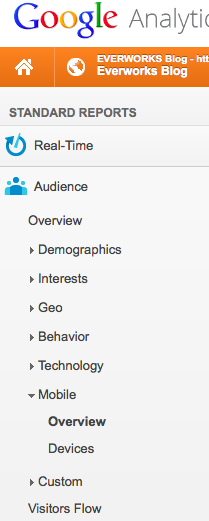
So let's start with Google Analytics; go to Google Analytics' page and click on 'Mobile > Overview (for a general outlook) / Devices (to better identify which device is exactly being used).

What does having user friendly, interactive, website do for you?


It gives your users an improved experience: everything your users do revolves around an experience and you would want to offer the best possible, positive, experience to your customer so that they will continue to serve 'feel good' feelings towards your offerings.

It increases average time on a website: Personally I would stay much longer on a website that is easily readable on my phone and as it would be on my computer. It is a drag when I have to zoom into websites that are just simply buggy all over the place causing fonts to move to places it shouldn't go to.

It loads websites faster: the phone does load things over a cellular network, having a lesser load not only allows websites to come up quicker, but it also makes it easy on data plans with a limit.

It gives you an added advantage over competition that don't have a device optimized website: this is a competitive advantage that will continue to be something that you can quickly capitalize on, considering that going mobile does require a certain amount of investment in both monetary and efforts.

Are Malaysian companies taking on interactivity?


Not all websites in Malaysia are taking advantage of a reliable hosting solution, let alone the importance of interactivity itself. Having a good reliable website that gives your customers information they need efficiently will greatly improve your business offerings.

2. Geo Location


Does your product attract a certain customer base of a certain country? This not only gives you an idea of where your customers are and how to best give to them what they need, whether culturally or in a language they prefer, but also in terms of latency and reliability of website availability when customers actually want to access the information of your offering.

Specified country


If I know that my customers are primarily from Malaysia for example what difference does it make?

To keep it short and simple, Malaysia is a country that has a national language of Malay, knowing that your customers are coming from Malaysia helps you to determine that your language base should also include Malay to streamline and improve customer interaction.

Should companies consider a local hosting company?

A user living far away from the server of your website will always see your website loading very slowly compared to the person who is closer to the server. A slow website always irritates the visitor (I would know because it irritates me) and that would cause them to switch to another website, making you lose valuable leads.

---

By using Google Analytics you can discern important information from those that can afford to be looked into later. Determining what devices your customers primarily look at and where they come from can give you unbounded potential to serve and provide a reliable service to them.

If you have something please feel free to do so in the comments section below!

image by PSD Blast

Saturday, 12 April 2014

Postponement Announcement - EVERWORKS scheduled email server maintenance


Dear Valued Customers,

Please be informed that there will be a scheduled email server maintenance for www.everworks.com 

The original scheduled maintenance would have to be carried out during a later date after our technical team has come across some technical difficulties that need to be addressed to ensure that r service during this period of time is unaffected:

Previous scheduled date:

11th April 2014 - 12th April 2014 
(Saturday Early Morning)
23:00 hrs ~ 05:00 hrs GMT+8 

Current new date:

18th April 2014 - 19th April 2014
(Saturday Early Morning)
23:00 hrs ~ 5:00 hrs GMT+8

Impact: This maintenance will have no downtime & service interruption to all EVERWORKS clients' network.

Objective: Migration of EVERWORKS mail server. 

For urgent inquiries please contact these hotlines: +6016 625 8763 or +6013 353 3886

For general inquiries on any matter please contact +603 7806 3550 or cvs@everworks.com (we will respond to your email inquiries only after this maintenance - for important support inquiries please contact the listed hotlines.)

Friday, 11 April 2014

The Importance of Server Location

With the world seemingly being more connected than it has ever been in the past decade or so, it often leads to the misconception that although every mobile is connected to the internet and cloud computing is fervent throughout most tech lingo, people overlook the importance of physical server location and how it can be beneficial to you. While it is true, that you can access information from any place, server location still plays a large role in everything. Here are a few factors that could just swing you back to thinking just whether your servers are in the right place or not.

Is server location actually important?


The answer to this question is simple. Yes it matters. A server doesn't only get damaged digitally, the potential of a physical harm is likely as well. Placing your server in a safer environment as compared to a potentially harmful one is greatly beneficial.

Server location affects the speed of your service!


The physical location that your servers are hosted in can affect the speed of hosted websites. This is important for local searches as it greatly effects the outcome of your visitors. Research shows that a visitor would leave a website if it doesn't load within 3 seconds; sometimes even less. 3 seconds isn't a lot of time, but it could ultimately result in poor conversions for website visitors.

Server Location; with respects to your website rankings, traffic and consequent success.


This aspect gets overlooked by most site owners and gets very minimal coverage in web design or SEO articles. Most articles are written by American writers and therefore are written from their perspective and location. However, if you happen to like many site owners in the world who are not from America, the view on this can be greatly beneficial.

If you are a business who has a significant client base in a native country you should depending on where you are, where your website is (hosted), what you offer, where your customers are, and whether you are a searcher, or a site owner. This greatly affects the outcome, and with respects to SEO, Server Location may be the crunch factor that converts searches into potential visitors. 

What this means for Local (Malaysian), and South East Asian countries?


Find a colocation server that suits you. Something close by. With us, EVERWORKS, Malaysia's Leading Datacenter and Mobile Hosting Provider that provides industry standard server colocation could be an easy option to consider. With a 30 Day Money Back Guarantee, a World Class Data Center, and Lowest Price Guarantee, all you need to do is just give it a try. 


---

Please share with us what you think in the comments section below.
  1. What is your experience with server location?
  2. Does it affect your site's speed depending on where you put your site?
  3. Do you think Server Location affects SEO (considering it gets so little coverage)?


Thursday, 10 April 2014

Announcement - DiGi Planned Maintenance

Digi Telecommunications Sdn Bhd will be conducting a scheduled maintenance during the period indicated below:

16 April 2014
00:00 AM ~ 06:00 AM (GMT+8)

OMMP & MMSC CS Portal unavailable - 1 hour

Intermittent SMS Service Impact - 20 mins

CPA MT SMS Intermittent Failure 
(MT SMS Intermittently unable to deliver to subscriber)

Digi's Fast Recovery Center is ready to assist you if there are any issues regarding this matter.

Digi Hotline: +6016 300 3000


If you have any queries on EVERWORKS SMS Hosting Service you can consult here for further information.

For technical inquiries and support please email our ever ready support at cvs@everworks.com